Section: Purchasing
Subject: Procedure, Order Non-Program M&S
Approved by: Tony Massey
Effective Date: 21 December 2021
Last Reviewed Date: May 8, 2026
Policy Owner: Senior Director of Purchasing
Policy #
A service center may need to order materials and supplies (M&S) not available in Microsoft Dynamics 365 (D365). This requires the requisition process to be completed on paper outside of our Enterprise Resource Planning (ERP) system.
PROCEDURE #
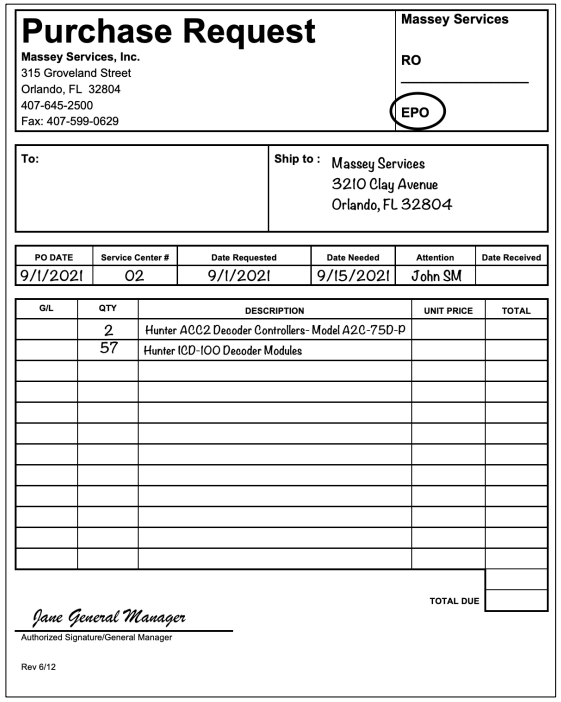
The procedure for filling out a Purchase Request form for M&S not in D365 is as follows:
- RO/EPO box: Indicate if the order is a regular order (RO) or an emergency purchase order (EPO).
- To: Enter the vendor’s name. If you do not know, leave blank.
- Ship To: Enter the service center delivery address. Do not use post office box addresses.
- PO Date: Enter the date you are filling out the form.
- Service Center: Enter the 3-digit service center number (include any leading zeroes).
- Date Requested: Enter the date you originally requested the product(s). This is generally the same date you fill out the form.
- Date Needed: When you need to have the product(s) arrive at the service center.
- Attention: Print the name of the person receiving the order.
- G/L: Enter the General Ledger code to be charged for this product.
- Qty: Enter the quantity and unit of measure (UOM) required. For example, 1 case, 15 bags, or 3 boxes.
- Description: Describe the product in detail, including container size, and product number or SKU if available.
- Unit Price and Total Columns: Leave blank. The Purchasing department will fill in this information.
- Authorized Signature: The EPO will not be processed without the general manager’s signature.
- Scan authorized EPO and forward to your purchasing agent.
- The office manager will keep a copy of each document to be utilized when the product, packing slip, and invoice are received.
Figure 1. Purchase Request form.