Section: Office Administration
Subject: Email Signature
Approved by: Tony Massey
Effective Date: 20 August 2024
Last Reviewed Date: 20 August 2024
Policy Owner: Vice President of Marketing
“We value our Company’s Image. The public perception of our people, vehicles, equipment and materials is essential to our success.”
Objective #
In order to ensure consistency across our brand, a standard Massey email signature was introduced in 2014. The email signature must be used by all team members with a Massey Services email account. Samples of the standard email address are below:

The standard email address will include:
- Team Member Name
- Team Member Title
- Massey Services Inc.
- Service Center (if applicable)
- Massey Services Address
- Team Member Phone # & Corporate 800#
- Massey Services Website
- Social Media Links to Facebook, Instagram, and LinkedIn
In addition, any degrees or industry-related certifications you have received are permitted.
Policy #
Under no circumstance should you, as an individual Team Member, include the following as part of your Massey Services email signature:
- Slogans or Quoted Sayings
- This could potentially turn off a customer or vendor
- Massey Logo or Other Images*
- This can cause emails to be marked as spam and depending on the size, may not be received by the intended recipient based on email size limitations. The image may also appear as an attachment at times, which may make the recipient weary of opening in fear of a virus.
- Use of a variety of colors or fonts
- Feature awards or honors
- Legal Disclaimers – there is legal precedent that disclaimers are non-binding
*There may be special circumstances that we do share an image to add to your email signature. This is acceptable during the specified time frame, and it should be removed once the event or promotion is over.
Additionally, your company email should not have a set background design – all email backgrounds should be the white background that Outlook uses as a standard template.
By implementing the same Massey email signature for all Team Members, we establish a consistent image around our brand. We also have the opportunity to market our Company to existing customers and to people you may have never met before. When your email is forwarded or sent along as a copy to someone else, that is an entirely new audience that sees our company information.
Additionally, by featuring links to our Social Media pages, this can build curiosity and cross promote our company.
How to Upload the Signature in Your Email #
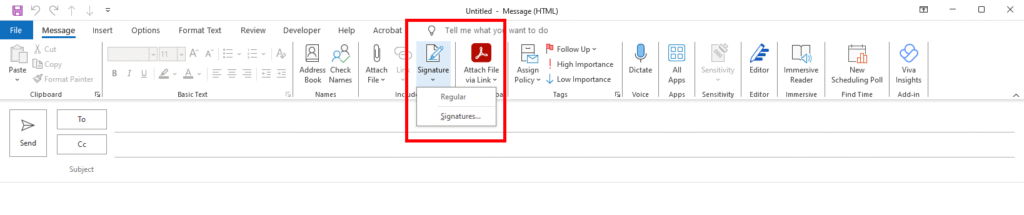
Step 1: Open a New Email. On the Message tab, in the Include group, click Signature, and then click Signatures.
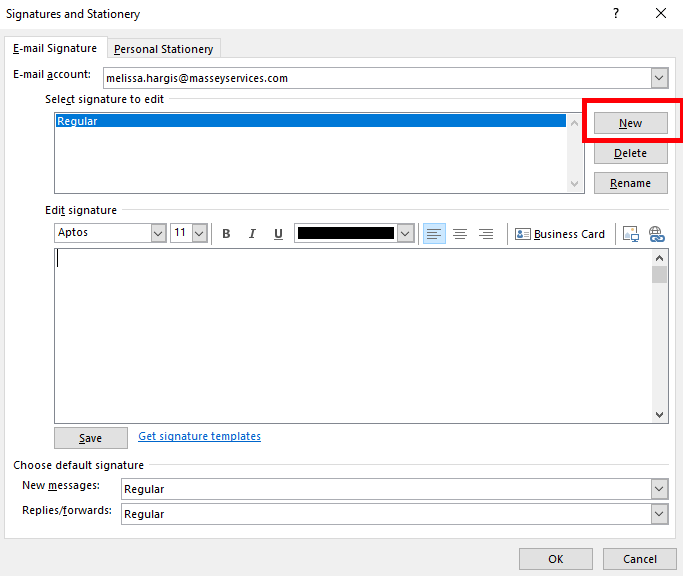
Step 2: On the E-mail Signature tab, click New.
Step 3: Type a name for the signature, and then click OK. Use “Massey Signature” for the name.
Step 4: In the Edit signature box, copy and paste the signature that was emailed to you.
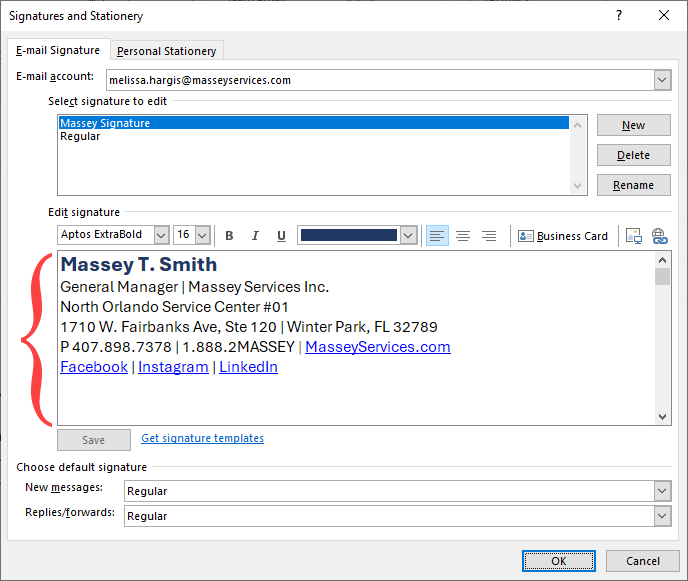
Step 5: To finish creating the signature, click OK.
Step 6: To make your default Email Signature, make sure Email Account has Default Signature selected. In the next two tabs – New Messages and Replies/Forwards, click on the drop-down arrow box and select Massey Signature, which is the name you gave this signature.
Step 7: To finish, click okay. You should now see your email signature when you open a new email.
How to Update the Signature in Your Email #
To edit your email signature as a result of a change in name, title, service center, etc., click on the Signatures tab in a New Email, select Signatures, select the Massey Signature, update in the Edit Signature box at the bottom and click Ok.