Section: Training
Subject: Service Center Training Meeting
Approved by: Jeff Buhler
Effective Date: 30 January 2026
Last Reviewed Date: 30January 2026
Policy Owner: Senior Director Learning & Development
Policy #
PURPOSE #
The service center and sales verifiable training materials are provided through Massey University. Completion and tracking of these training sessions are managed at the individual team member level. Each team member required to participate in the training will be assigned the relevant content. This procedure details the process for preparing, completing, and documenting these training meetings.
RESPONSIBILITIES #
General Manager/Service Manager Responsibilities #
Prepare for Training Delivery #
The necessary training materials are available in MILO. To access these resources, please follow the steps below:
- Open MILO.
- Available via the company intranet and on the iPad home screen.Click on “Service Protocols & VTM Materials.”Click on “VTM Archive.”Choose either the Sales or Service meeting content.
- Locate the current month and week’s required training materials.
- All necessary documents are consolidated into a single PDF for reference and review.
- Review the training materials thoroughly in preparation for the meeting.
- Identify team members who will present specific content and assign responsibilities accordingly to ensure presenters are prepared.
Deliver the Training #
- Direct team members to the specific materials they need to open and review.
- If quizzes are included, instruct team members to complete them individually. Group quizzes are not permitted.
- Passing scores are not mandatory for VTM completion; team members will have one attempt to complete each quiz.
- After completion, review any missed items to confirm understanding and reinforce knowledge transfer.
Team Member Responsibilities #
Follow these steps to access, train, assess, and post completion of a verifiable training meeting.
- Log in to your Workday account.
- The assigned training will appear on your home screen under the “Awaiting Your Action” section.
- If the VTM is not visible (the worklet displays only a few items), click on the “Menu” option located in the top left corner.
- Select “Learning.” Your required VTM course will be listed on this screen.

- Choose and launch the appropriate course.
- Wait for content to load.
- Click “Start Course” to begin.
- Read the instructions.
- Click “Continue.”
- Follow your trainer’s guidance on which items to access. The usual process will be:
- Complete the required information for all team members.
- Click “Continue.”
- Complete any provided quizzes. You will have one attempt. Passing is not mandatory for VTM completion.
- Click “Continue” once complete.
- Select the services as instructed by your trainer.
- Complete the required information for all team members.
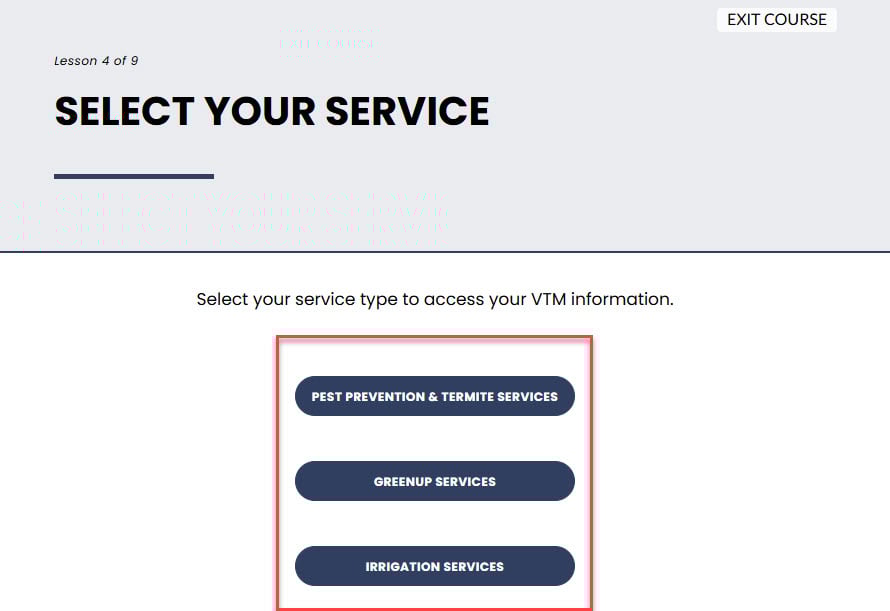
- Access the appropriate training files and follow the instructions provided by your trainer.
- Complete the training program.
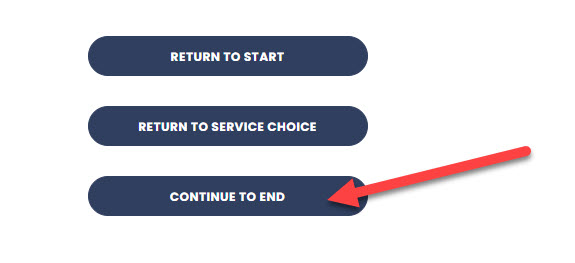
- If additional services are required, select “Return to Service Choice.”
- Once all required topics have been completed, click on “Continue to End.”
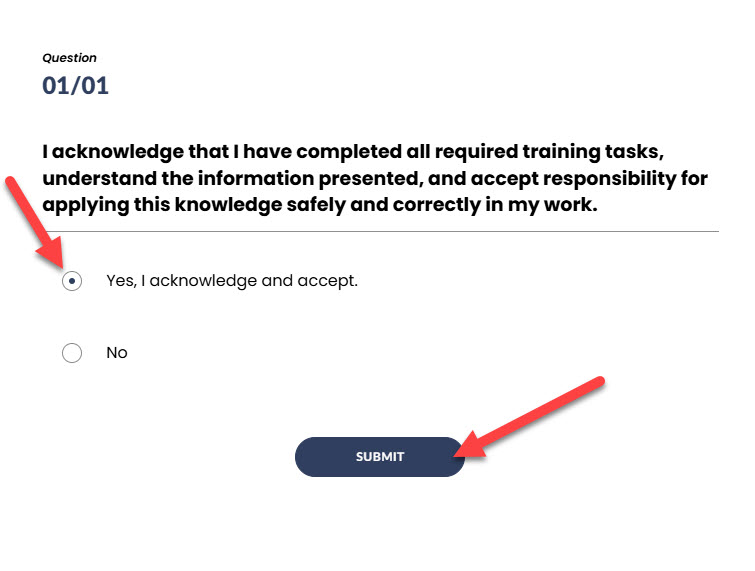
- Complete the Acknowledgement.
- Successful completion requires selecting “Yes, I acknowledge and accept.”
- Click “Submit.”
- Click “Continue.”
- To close the course, select “Exit Course” in the top right corner.
- This will automatically record your completion in your Massey University account.