Section: M&S Control
Subject: Procedure – GreenUp Daily Usage Summary Report
Approved by: Tony Massey
Effective Date: 21 December 2021
Last Reviewed Date: 21 December 2021
Policy Owner: GreenUp Technical & Training Director
Policy #
GreenUp Daily Material Usage Summary Report: #
The Daily Usage Summary Report is a daily check-in tool a GreenUp Service Manager uses to ensure agronomic program standards are met, application errors are identified, and corrective actions are taken quickly.
The Daily Usage Summary Report is an Excel Workbook. It is divided into multiple tabs:
- Non-Program Materials
- For any used materials not part of the current month’s agronomic program(s), enter the name, unit of measure, price per unit of measure, and the D365 item number. This information will carry over throughout the workbook.
- Daily Check-in Sheet
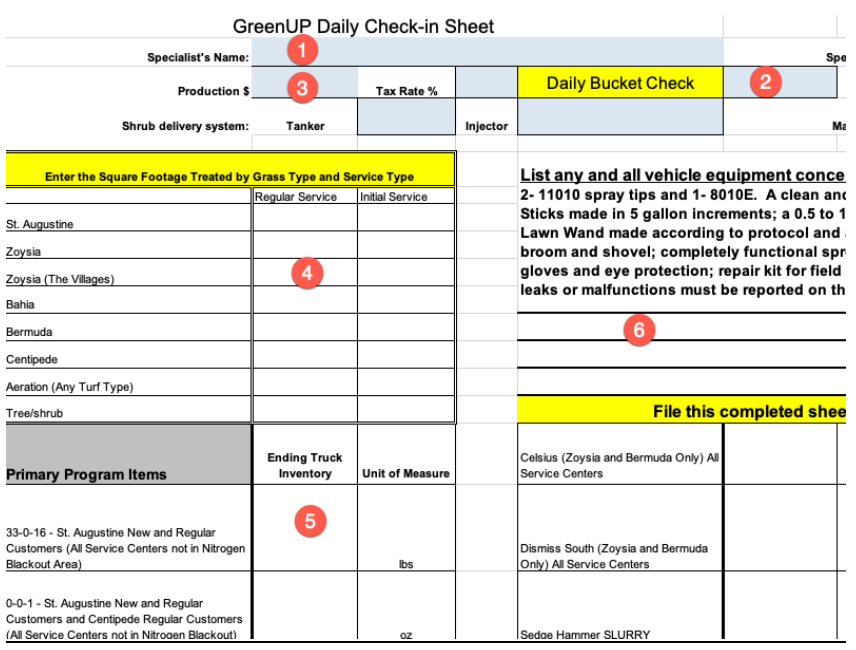
- Print this page for Lawn Specialists to complete their truck ending inventory.
- Monthly Issuance Sheet.
- Print these sheets and keep a set for each vehicle. They serve as a logbook to track and review product issuance from the warehouse to each vehicle.
- Barcodes.
- This tab provides D365 product numbers and barcodes for the current agronomic program. These are used to issue product via a handheld scanner.
- Individual dated tabs.
- Tabs track material usage by day.
- Monthly Audit Sheet.
- This tab provides a month end recap of totals and variances for all materials used.
Completing the Daily Material Usage Summary Workbook: #
Lawn Specialist Duties
In the morning,
- Enter in the Specialist’s name.
- Complete a spray system bucket check. Write the gallons per minute in “Daily Buck Check..”
At the end of the day, complete the remainder of the form. - Total and enter the completed production dollars.
- Total and enter the completed production square footage by grass type.
- Complete a full count of all materials on the vehicle. Add these values under “Truck Ending Inventory.”
- If there are any vehicle or equipment issues, note these in the space provided.
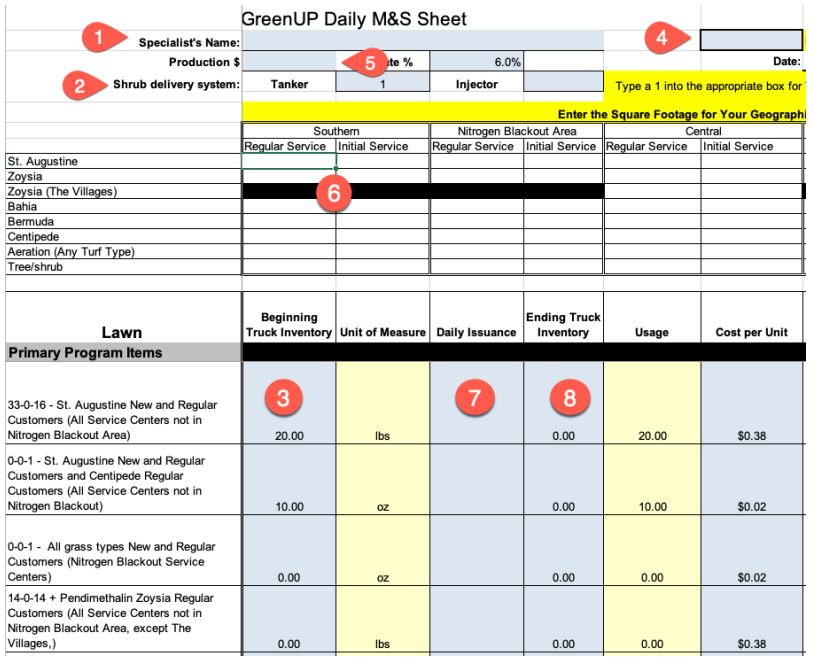
Service Manager Duties #
Every month the Quality Assurance department will provide service centers a current GreenUp Daily Usage Summary. The Service Manager creates a copy for each production vehicle to record the product issued for the assigned production. Save the individual workbooks on the G:/Drive under the service center name and within a folder called “M&S.” Organize the M&S folder by year and month.
On the first workday of the month, open tab “1.”
- Enter the assigned Specialist’s name and the vehicle TL# at the top of page/day “1.” This will autofill each of the consecutive tabs.
- Choose the shrub delivery system, tanker or injector, by entering “1” in the corresponding box (row F).
- Enter the beginning truck inventory (column B) for all materials. This is the ending inventory counts from the previous month. Be sure to use the same unit of measurement listed (Column C).
- If a product is missing, add it to the”Non-Program Material” Page.
- If no production or materials were used:
- Enter a “1” in cell G2. Repeat this process until you reach the tab for the first day of production.
- Enter the total in the cell “Production $.” This is provided on the “Daily Check-in Sheet.”
- If production or materials were used:
- Enter the total in the cell “Production $.” This is provided on the “Daily Check-in Sheet.”
- For each turf type, enter the completed square footage for both regular and initial services in the appropriate geographical location. These measurements are procided on the “Daily Check-in Sheet.”
- Geographic location information is provided in each agronomic program. Programs are located on the G:/Drive in Shared/GreenUp Reference Materials/Currrent Agronomic Programs.
- Under “Daily Issuance” enter all issued materials. Be sure to use the same unit of measurement listed (column C). These totals come from the completed “Monthly Issuance Sheets” for the vehicle.
- Under “Ending Truck Inventory” enter the totals from the completed “Daily Check-in Sheet.” Be sure to use the same unit of measurement listed (column C).
- The Ending Truck Inventory will automatically carry to the next day’s beginning inventory.
- The form will auto-calculate program usage.
- Variance will be provided in both unit and dollars.
- Unit variances greater than ±10% will be displayed in red. The Service Manager must inveestigate the cause of each variance and enter the findings in “Explain All Variances.” The Service Manager must include the actions they took to correct the issue that their investigation determined was the cause of the variance.
- Once complete, print the formr.
- Both the Service Manager and the Lawn Specialist sign the form.
- Attach to the completed production packet.