Section: Sales
Subject: Daily Sales Activity Report
Approved by: Tony Massey
Effective Date: 1 June 2014
Last Reviewed Date: 6 June 2014
Policy Owner: Vice President of Business Development
Policy #
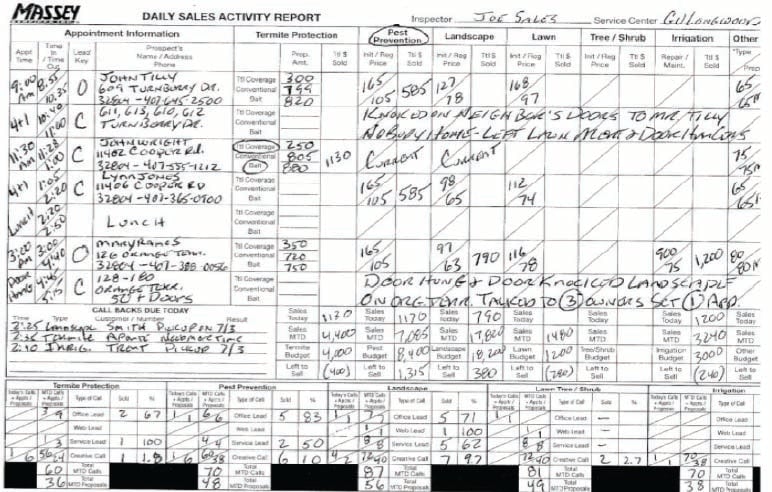
The Daily Sales Activity Report (DSAR) is to be used by all Inspectors and Account Managers. This report will be prepared every day and must reflect all activities of the day.
The Daily Sales Activity Report (DSAR) is Service specific with each service having its own column for information (Exhibit A).
DAILY SALES ACTIVITY REPORT
The Daily Sales Activity Report is prepared as follows:
- In the upper right corner, the Inspector/Account Manager is to print the date, the Service Center and their name.
- Pre-list today’s appointments. The activity report should be updated after each call is made.
- Below is the information required for each of the columns on the report (place the appropriate information under the appropriate service (i.e. Termite Protection, Pest Prevention, Landscape, Lawn, Tree/Shrub, Irrigation, Other Services).
- Appointment Time – Enter the time each appointment is scheduled to start.
- Time In/Time Out – Enter the time you arrived at your appointment for “time in” and enter the time you leave your appointment for “time out”.
- Lead Key – Indicate whether the lead was an office lead (this will include web leads), service lead or creative appointment.
- Codes:
- O – Office Lead OCB – Office Lead Callback
- W – Web Lead WCB – Web Lead Callback
- S – Service Lead SCB – Service Lead Callback
- C – Creative Appt. CCB – Creative Callback
- Codes:
- Prospect’s Name – Print customer’s first initial and last name. For commercial accounts, indicate business name and contact name.
- Address – Show complete street address.
- Phone Number – Show phone number of customer.
- Termite Protection – Indicate the total price quoted for each type of termite protection solution offered. NOTE: Drywood Termite Proposals and sales are to be placed in the “Other Services” column.
- Termite Price Sold – Indicate the total price sold for Total Coverage, Conventional, or Bait.
- Initial/Regular Price – In the top portion of the box, show the initial charge or special service charge for services proposed in Pest Prevention, Landscape, Lawn Care, and Tree/Shrub. In the bottom portion of the box, show the regular service price proposed in Pest Prevention, Landscape, Lawn Care, and Tree/Shrub.
- Total Price ($) Sold – Indicate the total annual contract price for Pest Prevention, Landscape, Lawn Care, and Tree/Shrub.
- Irrigation – In the top portion of the box, show the Irrigation Repair proposal amount and in the in the bottom portion of the box, show the Irrigation Maintenance proposal amount
- Total Price ($) Sold – Indicate the total annual contract price for the Irrigation Service(s) sold.
- Other Services – In the top portion of the box, show the other service type (refer to codes provided in the bottom right of the DSAR) being proposed. In the bottom portion of the box, show the annual proposed amount of the service.
- Total Price ($) Sold – Indicate the total annual contract price for the service sold.
- Comments – Indicate any comments, which may pertain to the customer/prospect, including reason lost and/or pending, the scheduled start date, etc.
- Callback Date – Indicate the date you will make a callback on all pending accounts. Immediately transfer the account’s information to the appropriate 1-31 page, or add it to the January- to- December Index pages following the 1-31 pages. A separate 1-31 page will be added as needed for future months callbacks .
- On a daily basis, the following columns must be totaled and both the daily and month-to-date sales figures entered in the appropriate boxes at the bottom of the respective columns. In addition, the monthly budget amount and amount “left to sell” (calculated as “budget” less “Sales MTD” are to be entered for each service type below:
- Termite Protection Total Price Sold
- Pest Prevention Total Price Sold
- Landscape Total Price Sold
- Lawn Total Price Sold
- Tree/Shrub Total Price Sold
- Irrigation Total Price Sold
- Other Services Total Price Sold
- Call Backs Due Today – For each call back scheduled to complete, show the time of day, type, customer name, customer telephone number, and result.
- The Odometer Reading box in the bottom right corner is to be completed by all Inspectors and Account Managers driving company vehicles. Indicate the odometer reading at the start of the workday under the line labeled “A.M.”. Indicate the odometer reading at the end of the workday on the top line labeled “P.M.”. Subtract the A.M. reading from the P.M. reading to obtain “Mileage Driven”.
- On a daily basis, the Sales Inspector is to record the number of Office/Web leads scheduled to be seen, the MTD number of Office/Web leads seen, the MTD number of Office/Web leads sold, and their closing percent. The same thing is to be done for Service Leads as well as for Creative appointments.
- The Inspector/Account Manager must sign the Daily Sales Activity Report after the report has been completed. After reviewing, the General Manager must sign the report indicating his acceptance of the information therein.
- Prior to the Daily Accountability Session held each morning, the Inspector/Account Manager must complete the prior day’s activity report and prepare a new report (pre-list) for today’s appointments. All signed Service Agreements or completed proposals/graphs must be attached to the prior day’s Activity Report for every inspection indicated. The General Manager’s copy of the pre-list and the Daily Sales Activity Report is kept on file in the Service Center Office. The Inspector/Account Manager maintains the sales copy for follow-up.