Section: Termite Administration
Subject: EPT Program Administrative Procedures
Approved by: Tony Massey
Effective Date: October 1, 2001
Last Reviewed Date: May 5, 2025
Policy Owner: Director of Administrative Training
Policy #
OVERVIEW
Liquid termiticides degrade over time. As such, it is in the interest of our customers and our company to ensure that in advance of a complete breakdown of the treated zone that a treatment that enables extension of protection is completed. This process is known as our Extended Protection Treatment program or EPT.
The combination of the 5+ year pre-treat agreements, 10+ year termite agreements and the advantaged pricing of Termidor® and Sentricon™ allow us an opportunity to re-initiate a standardized EPT program. Two major factors—in addition to execution—remain central to the success of this program: 1) price to the customer; and 2) maintaining customers who opt out of the EPT.
Current customers choosing to have an EPT will receive a new multi-year agreement at substantial savings off of our current rate card. In addition, a standardized approach to both initial contact and non-treated extensions will minimize cancellations as well as reduce our enhanced exposure.
Each team member involved in the EPT program has a very critical role to play. Compliance with the outlined process will enhance our results while failure will negatively impact our business and customers.
Pricing #
EPT with Liquid #
Treatment price will be $2.90/lin ft; the upcoming renewals will be either current rate card or current renewal whichever is greater.
EPT Converted to Bait #
Treatment price will be $3.00/lin ft; the upcoming renewals will be either current rate card or current renewal whichever is greater. (review pricing)
Process & Responsibilities/Duties #
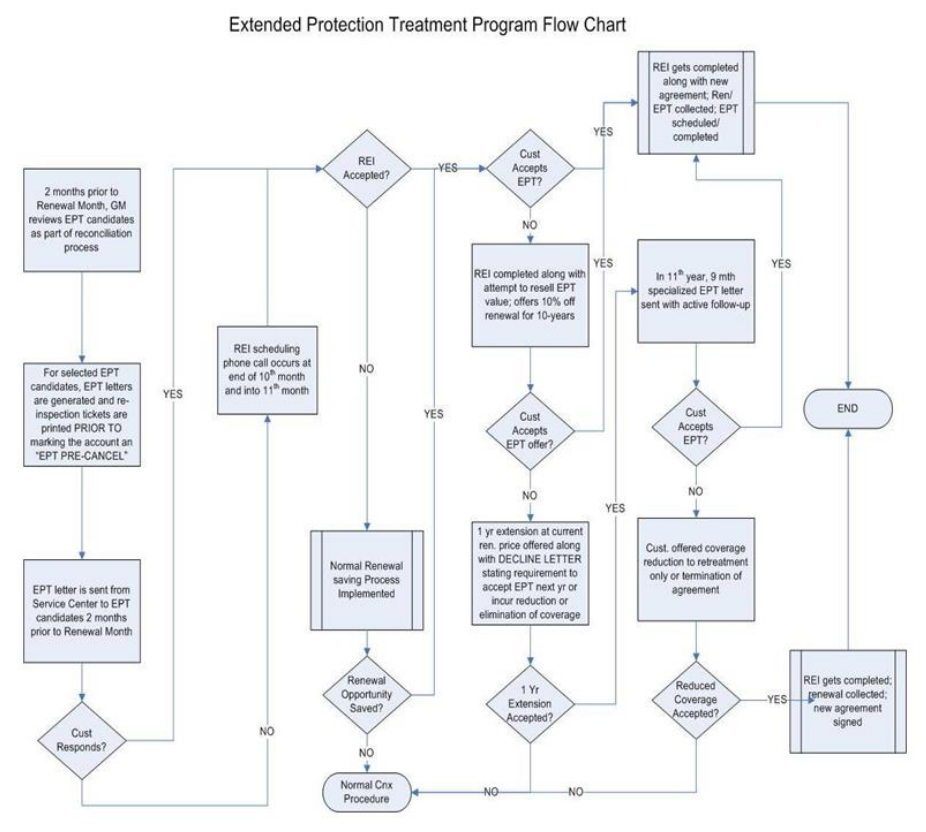
Incorporated in this P&P is the workflow diagram for both the initial year of the EPT program and subsequent years. In addition to the workflow diagram, below and on the following pages is an outline of steps and responsibilities/duties in order to ensure each team member understands their role in securing the protection for our customers and ourselves.
Table 1. Summary Description of Steps
| Timing of Action | Description of Action | Responsible Person(s)/Departments | Implications |
|---|---|---|---|
| 2 months prior to Renewal Month | Termite reconciliation in accordance with termite renewal processing calendar | Managers | Manager IDs EPT candidates, prints letters, runs re-inspection tickets PRIOR TO marking them as “EPT Pre-cancel” in the system |
| 2 months prior to Renewal Month | EPT letters sent | Managers | Schedule EPT-REIs to bee completed, answer questions relating to the EPT, handle intent to cancel per policy |
| 1-2 months prior to Renewal Month | Schedule Reinspections | Office Admin., Sales Inspectors | Schedule REIs and discuss EPT that the Sales Inspector will cover with customer. The key is to get the REI scheduled.In addition to any manual tracking required, “EPT Re-inspections” will be entered into the lead log as “Creative” lead type with“EPT” as a “marketing code”. |
| On-going | Resinspections, attainment of EPT | Sales Inspectors | Can secure both the renewal and the EPT (to be scheduled while at the customer’s home during the reinspection, renewal only, or handle intent to cancel |
| On-going | Cancellation Avoidance | Service/General Managers | Can resolve customer’s intent to cancel up to re-selling the EPT |
| On-going | Administration | Office Admin. | Captures the assignment and result of EPT reinspections ensuring compliance with company standards and retaining our customer base |
The outline below restates with greater detail the steps of the process:
- Customers in their 10th+ year (and 5+ year if pretreat) who are selected by the manager for EPT (See H. a. for exclusions or ineligibility) will have letters produced, re-inspection tickets printed PRIOR TO being “EPT Pre-Cancelled” according to the existing EPT and renewal reconciliation steps found in the renewal processing calendar and will receive a personalized EPT letter sent by the general manager informing them that it is time to extend their protection, justifies the required action, identifies options (maintain current coverage, upgrade to bait), and covers next steps.
- Customers responding to the letter will be handled according to their situation.
- Those agreeing to the EPT will have their re-inspection scheduled. Upon re-inspection, a new agreement will be covered and signed, the EPT scheduled, and both the renewal and the treatment payment will be collected. As work is turned in, the re-inspection will be posted, the collected renewal will be posted, and the EPT will be entered as a new sale with a schedule date (the EPT will be posted once the work is completed).
- Those customers not sure or not wanting the EPT, but wanting to renew coverage will be scheduled for their re-inspection. After completing the re-inspection, the customer will be educated as to the value of the EPT and attempted to be re-sold. If this is successful, follow step a. above. If this is not successful, then:
- The team member is to contact the general manager and the general manager is authorized to discount the current and upcoming renewals 10% if the customer accepts and pays for the EPT. This allows us to provide the treatment we know is needed, secures the customer’s renewal, and makes it difficult for them to be cannibalized by competition due to the lower renewal price.
- If the discount offer doesn’t secure the EPT, the customer will be provided an EPT Decline Letter which states that we’re extending coverage for one year, but that next year they will need to have the EPT done or choose to have their protection reduced.
- Those customers wanting to cancel their coverage are immediately handled by the manager according to our cancellation policy.
- For customers who renewed but did not accept the EPT , follow the administrative steps outlined in step 7- k-o until they come up again as part of the reconciliation process at which time they will be marked “EPT PRE-CANCEL” in ServicePro and receive an EPT letter as part of the EPT process.
- Those customers who decline the EPT the second time around (i.e. those with an EPT Decline Letter in their file) and who chose to reduce their retreatment/repair protection for retreatment only will be able to “upgrade” back to repair/retreatment coverage in subsequent years by accepting and paying for the EPT and will receive a new multi-year agreement at that time.
- Due to the importance of retaining our 10+ year termite customers along with securing the EPT and cross-selling, “EPT re-inspections” will be tracked and will be looked at similar to office/web leads. Scheduled “EPT re-inspections” will be entered into the Lead Log as “Creative” lead type and “EPT” marketing code. Managers will review the EPT Performance Report to see how each team member assigned EPT re-inspections is doing both in terms of securing the EPT (80% standard) and cross-selling pest and lawn. Only 10 EPT re-inspections can be assigned to any team member per month and must maintain an 80% close rate to receive any additional EPT re-inspections in the following month(s).
- Customers can be converted to bait during the EPT process. The Corteva code for all EPTs converting to bait is “Termite Monitor Upgrade”. Refer to the administration training manual for how to convert a program in ServicePro.
- Administrative procedures on successful EPTs are as follows. These procedures are critical to ensure we properly account for customers accepting their EPT.
- Print Renewal Reconciliation Report by the 5th of the month.
- With general manager, identify accounts to be added to EPT Program.
- Selecting the appropriate letter version from the EPT Letter Generator, print EPT Letters on Service Center Letterhead and photocopy..
- Mail letters.
- Print Reinspection Service Report from customer’s account.
- Cancel program with “EPT PreCancel” as the reason, using “Next Renewal Date”. This is critical to ensure these customers *do not* receive a renewal statement in the mail. You cannot print tickets or use the EPT Letter Generator on a cancelled account, so it is imperative that you follow these steps in this written order.
- Edit the account information and type “EPT – Renewal Month (use actual month/year)” into the [Customer Info] field to mark the account with an orange notation. This will be helpful to identify these accounts when the customers call in, especially for our team members in Customer Care.
- Pull file, attach copy of EPT letter and Re-inspection Service Report.
- Add customer accounts to the Lead Log as a Creative Lead with EPT as the marketing code.
- Give the customer file with attachments to the general manager to assign; files do not leave the service center.
When a Customer Purchases EPT #
- Reinstate original program.
- Add a renewal notice to the program so you can post the payment.
- Modify the date of the re-inspection to the date it was completed, as it will have automatically changed to next year’s date when the program was reinstated. Make a note of the new work order number for posting.
- Post the completed re-inspection.
- Post the renewal payment and remember to select the Inspector in the [Collected By] dropdown.
- If the program remains the same (Subterranean TP), add a new EPT event with the price of the EPT, date the treatment is scheduled, and Inspector to be commissioned.
- If the program does not remain the same (customer purchases bait or upgrades to Total Coverage), cancel the original program *again* using today’s date and the cancel reason “EPT – Baiting Conversion” or “EPT Cycle Freq./Program Change “, whichever applies. It is important that we show the original program with the paid renewal so follow the steps to reinstate it for the payment and re-inspection service first as outlined in A-E in this section above.
- Add the new program to the customer’s account, making sure to choose the EPT service event, and add the treatment date, price, and Inspector to be commissioned.
If Customer Only Purchases a Total Coverage Upgrade, not the EPT #
- Follow steps k-o above.
- Cancel the Program *again* with the reason “Cycle / Frequency Change” not “EPT-Cycle / Frequency Change” using today’s date.
- Add the new program to ServicePro using the original program’s warranty date. This is critical, so that we can identify this customer as an 11th year customer next year.
- Sell the upgrade service event with date, price, and Inspector on the invoice.
If Customer renews, but does not Purchase EPT at this time #
- Follow steps A-E in section “When a Customer Purchases EPT” above.
Miscellaneous #
- Reasons for customers being ineligible for EPT include:
- an on-going claim not yet resolved;
- specific notes in the file or computer system notating that customer is not eligible for EPT;
- other factors based upon manager’s review of the file and in communication with his or her regional manager; or
- has been retreated using Massey protocols within the last 2 years.
- Homes with stucco on wire lathe or siding below grade are eligible for EPT but the stucco or siding must be cut to above grade or coverage is to be reduced to retreatment only.
- In the event that more than 10 EPT re-inspections per inspector are available in a month, the extra EPT re-inspections can either be assigned to the general manager or can be handled in the forthcoming month. By design, no more than 10 new EPT re-inspections can be assigned to an inspector in any month. Also, EPT re-inspections are not to be assigned to service managers or re-inspectors.
- For customers with lifetime conventional agreements (1994-1995), we will either convert to bait as outlined in this policy or we will retreat at our expense.