Section: Sales
Subject: TeamUp Referral Program
Approved by: Tony Massey
Effective Date: 6 June 2025
Last Reviewed Date: 6 June 2025
Policy Owner: VP Business Development
Policy #
At Massey Services Inc., “We believe in building LONG-TERM, TRUSTING RELATIONSHIPS with Customers and Team Members.” In addition to the retention of our services and loyalty that develops over time, we know that customer referrals are a significant opportunity for us to grow and develop additional customer relationships. Currently, our company offers the PASS it ON referral program for residential referrals.
Purpose: The TeamUp referral program is designed to create an opportunity for businesses to refer their customers to our company. TeamUp is a business referral program that complements our residential referral program.
Program Rules #
- The incentive includes a $50 referral incentive after the initial service has been started and paid; and an additional $20 incentive for each additional recurring service purchased by the same customer.
- Companies that refer their customer(s) to our company are eligible for a financial incentive after the referred customer has purchased our service(s).
- Companies with a business license are eligible for the program.
- Companies must provide a current W-9 to verify the business. (see Appendix A)
- The incentive is for recurring-revenue services over $200 in annual value.
- One-time sales over $300 are eligible.
- The incentive is for new customer acquisition only. A business who refers a customer who has service(s) with our company will not receive an incentive for that property except that:
- A TeamUp referred Massey Services Inc., customer with only a pre-treat service will be treated as a “new customer” in the TeamUp program.
- The incentive cannot be combined with any other offers or discounts except for pay in advance (PIA).
- The incentive is only applicable for new services sold at full rate card.
- Any requests not submitted within 60 days must be reviewed by the regional manager prior to processing.
- Initial and retention referral incentives will be expensed to the Sales Promotion line of the profit and loss statement (P&L).
- Discounts may not be substituted for referral payout.
- The Remittance Form must be completed in its entirety and emailed to Customer Care at teamup@masseyservices.com for fulfillment.
- The new customer must be listed in ServicePRO for the referring business to receive their referral payout.
- The new customer must have paid for service and initial service has been completed for the referring business to receive their referral payout.
- Any TeamUp referrals that deviate from these guidelines are subject to approval and must be explained in detail.
Instructions #
Signing up Service Providers: #
- The sales inspector or other team member meets with a TeamUp service provider candidate and covers the value of being part of our TeamUp program.
- After covering the value, the team member covers the features, benefits, and rules of the program.
- The team member then fills out the appropriate portions of the Sign Up Form and has the TeamUp Candidate complete the business information. (see Appendix B)
- The team member secures a W-9 from the new TeamUp service provider.
- Once completed, the team member signs and dates the Sign Up Form, covers it with the general manager at check-in, and scans/emails the Sign Up Form and W-9 to teamup@masseyservices.com.
Entering a TeamUp Referral Sale #
- Following the sale of a TeamUp referred customer, the team member is to complete the TeamUp Remittance Form with the assistance of the office manager. (see Appendix C)
- The office manager confirms the vendor is listed in the TeamUp Vendor Tracker.
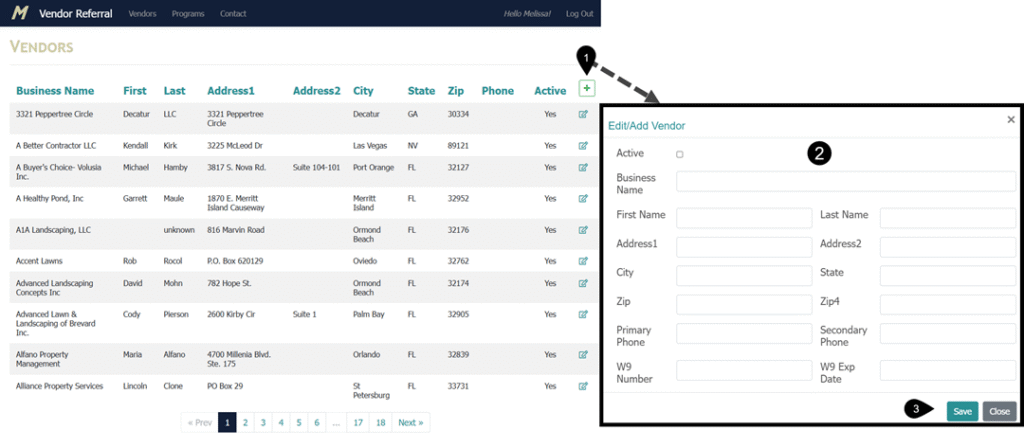
- If not listed, add the vendor information. (see Example #1)
- The office manager then scans and forwards the remittance form to CC at teamup@masseyservices.com.
- Customer Care completes the following:
- Verify the vendor is listed in the vendor table in ServicePRO.
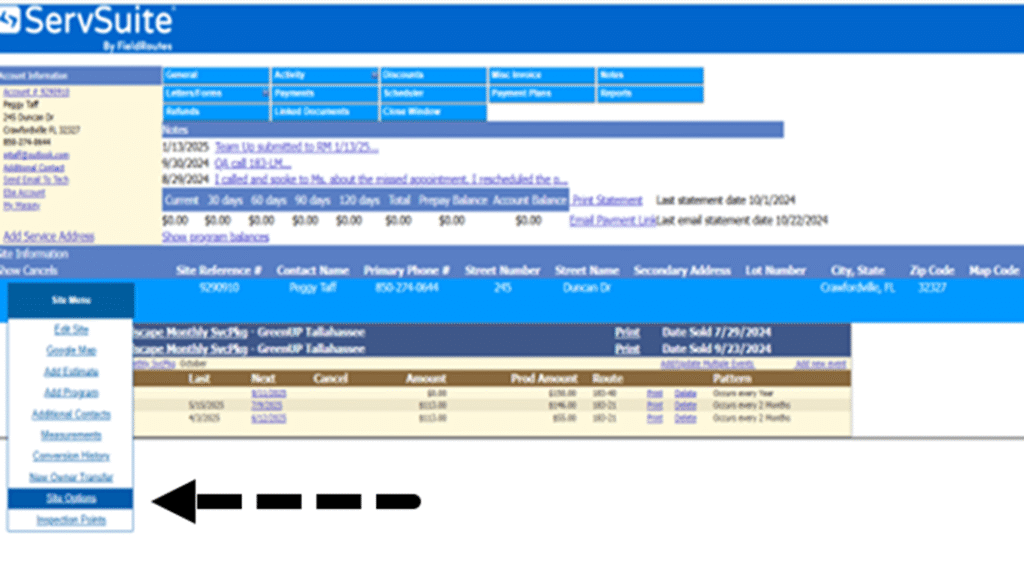
- Enter the vendor name, discount program (HRIS) and service start date in the site menu/site options section on the customer’s ServicePRO account. (see Example #2)
- If there are multiple sites only enter the information on the corresponding site for the new service
- Verify the service has been started and paid, for each TeamUp incentive submitted.
- Enter the incentive request on the TeamUp tracker located in the TeamUp Program folder in the G:Drive.
- G:/CustomerCare/TeamUp.
- All requests for the previous month must be filled in by the 2nd business day of the month.
- Run the TeamUp Initial Sales Report located in Reporting services on the 3rd business day of the month.
- Reconcile all requests received to the Initial Sales Report and the TeamUp Tracker.
- Prepare an Accounts Payable voucher for each referring company for the previous month by the 4th business day of the month.
- Enter the customer’s name and account number in the explanation field of the voucher.
- Forward to the regional manager for signature.
- Upon approval, the regional assistant forwards to accounts payable for payment processing.
- Initial referral incentives are paid by the 15th of the month.
Example #1: Adding a new or editing an existing TeamUp Service Provider. #
Enter the address https://vendorreferral.masseyservices.com/ into your browser. In the Vendor Referral Tracker you can:
- View the list of vendors alphabetically by business name, first name, last name, address or city.
- Edit an existing vendor by selecting the edit symbol on the right side of the appropriate vendor record
- Add a new vendor by:
- clicking the green plus sign on the tracker column captions,
- entering the new partner’s information into the tracker,
- and clicking Save.
Example #2: Adding a vendor name, discount program and start date into the customer’s ServicePRO account. #
Select Site Menu and click on Site Options. In the Site Options screen:
- Select the TeamUp Partner’s Vendor name from the Drop-down List
- Select the Discount Program HRIS
- Enter the start date for the program.
- If there are multiple programs being started, use the latest program start date in the date field
Frequently Asked Questions #
Submitting an AP voucher #
- What do we use for the invoice number and invoice date?
- Per Accounting, since there is no invoice number, we will just use the date submitted (the date the service center submitted it – by referencing the date on the form) for both fields.
- Is there a due date?
- Use the same date as the invoice date.
- What is the account description?
- TeamUp (HRIS)
- What is the account code? Who gets billed?
- 629300
General Issues #
- What note should Customer Care put in the account?
- A note should be entered on the customer’s account that the TeamUp incentive was received for processing.
- Under site options (Start Date), do we use the Initial date or Date Submitted?
- We use the “Initial” date as this is also what reporting will use to generate the yearly reports for the 2nd payout.
- Is it necessary to have Customer Care and the regional manager sign the form?
- Customer Care still needs to sign and date the form as this gives visual confirmation to the RM that it has been verified by Customer Care for the pertinent documents and information.
- Where are the forms on-line for the service center to access?
- X-Drive > Sales
- Who secures the W-9 and at what time?
- The team member is to secure the W-9 at time of referral.
- The service center is responsible for ensuring this is forwarded to Customer Care also with the Service Provider Sign Up form.
Appendices #
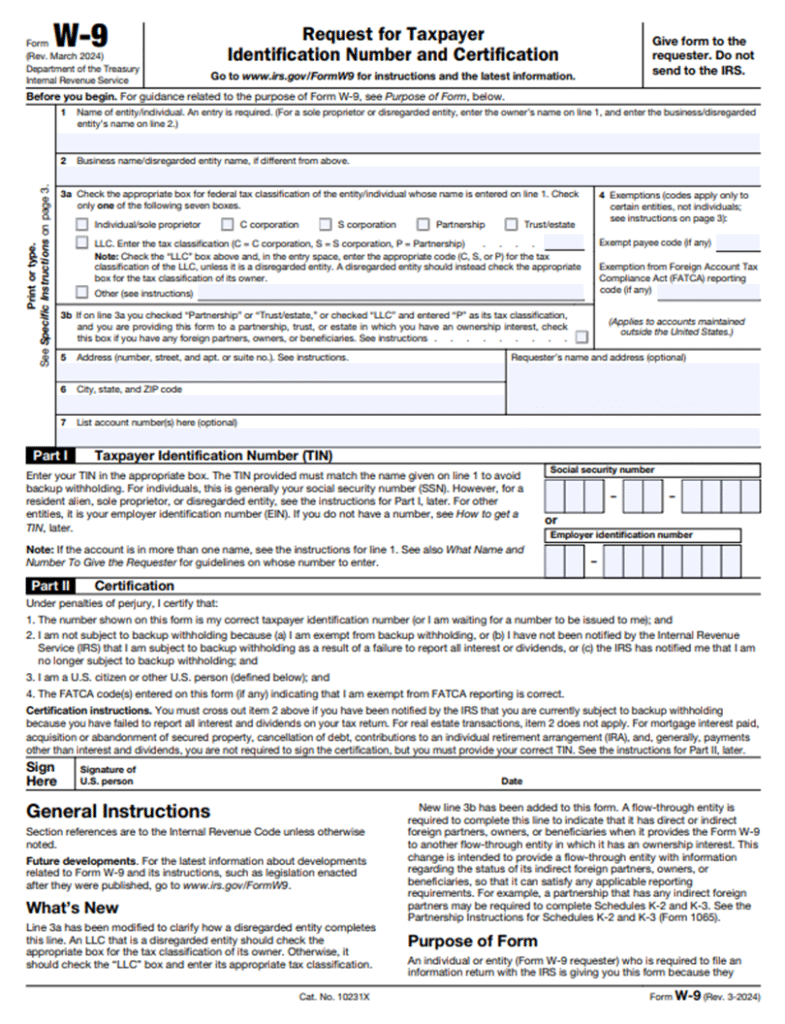
Appendix A: W-9 Form 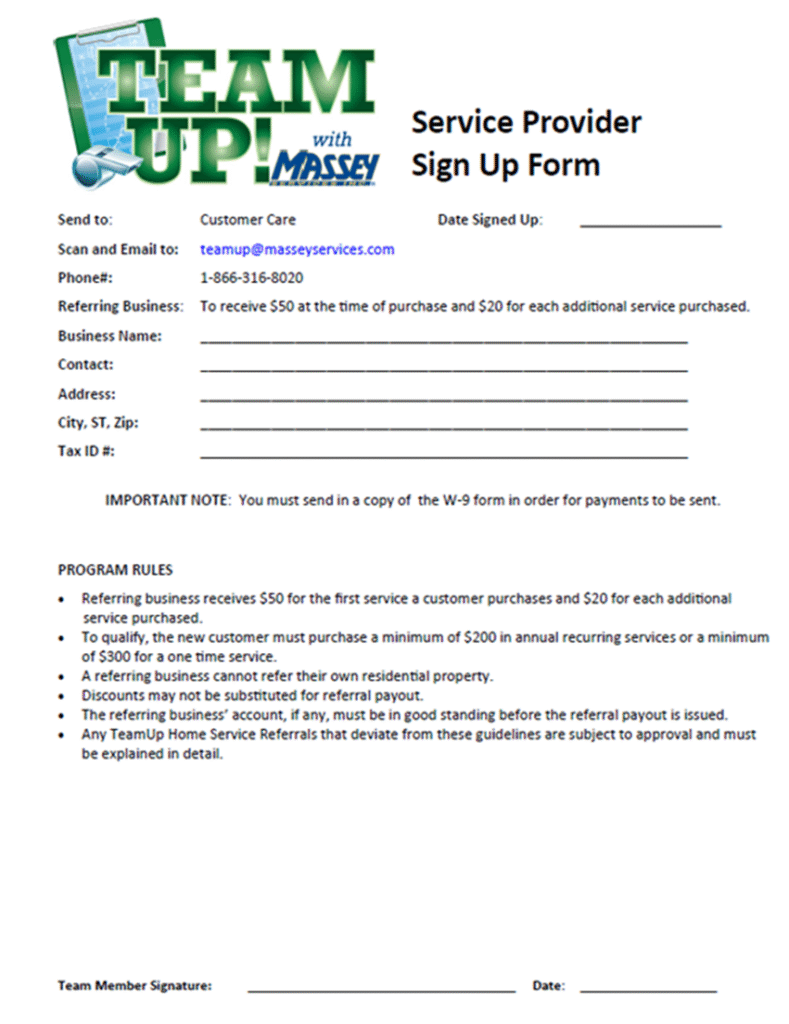
Appendix B: TeamUp Service Provider Sign Up Form 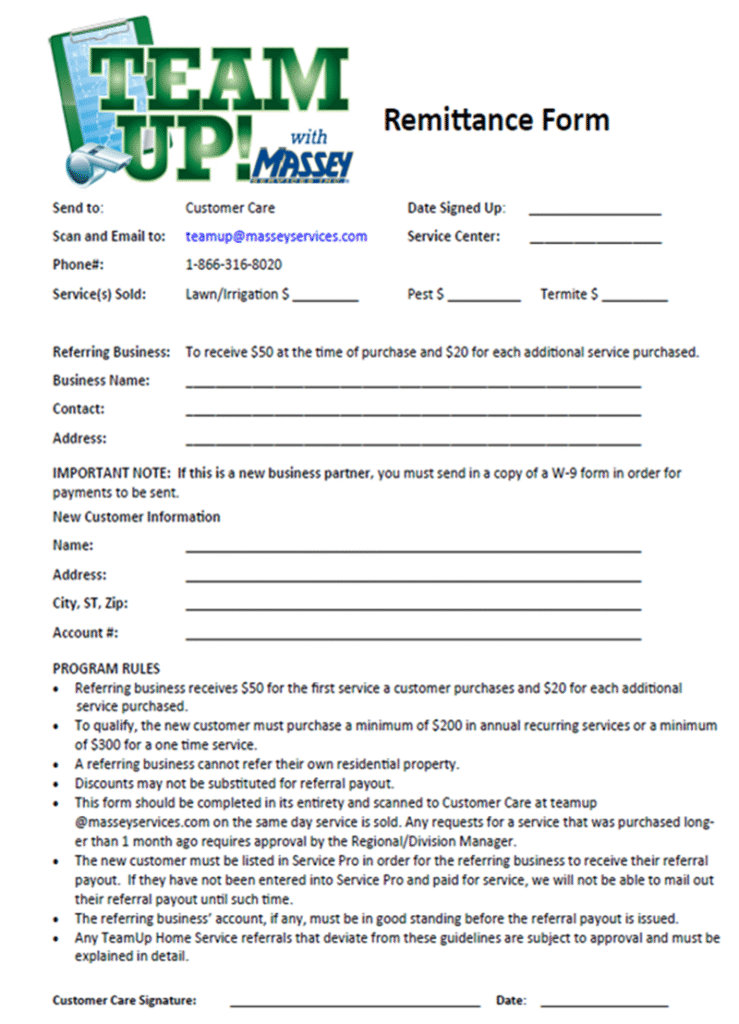
Appendix C: TeamUp Remittance Form