Section: Service Procedures
Subject: Scheduling Pest Prevention Services
Approved by: Tony Massey
Effective Date: 29 January 2001
Last Reviewed Date: 14 October 2025
Policy Owner: V.P. Director of Quality Assurance
Policy #
Guidelines for Maintaining Service Productivity #
All Massey team members are required to perform a full day’s work each and every day. We have created service protocols and rate cards that allow pest technicians to provide the absolute best pest prevention service in the industry while earning a very good income in the process. Our minimum productivity standards give guidelines for the number of paid services that should be performed daily and take into consideration both the quality of work required by our service protocols and the quantity of work required to support the minimum standards.
The service manager is responsible for organizing and assigning a full day’s work to each technician. They should consider in-office time, break time, driving time, vehicle maintenance time, training time, extra service time, etc., when assigning work.
The minimum productivity standard for our Pest Prevention program will vary based upon the service frequency model being sold. We currently offer monthly, bi-monthly and quarterly service frequencies. In general, a monthly account will be allocated 20 minutes, a bi-monthly account 30 minutes and a quarterly account 36 minutes of service time. Technicians will be assigned a minimum of 6 hours of actual service time each day. This assigned service time does not include in-office time, break time, driving time, vehicle maintenance time, training time, extra service time, etc.
Scheduling Production #
Responsibilities
Service Manager Responsibilities
A full day’s work is defined as a minimum of six hours, or 360 minutes, of production time. A full route is 20 fully productive days. The service manager will build fully productive days and routes to minimize drive time.
Scheduling Recurring Service Production
The following example outlines the time to complete a stop, a full day of production, and a full month using quarterly pest prevention services. When organizing and scheduling the service manager will use the actual mix of pest service types and current company treatment standards. These are available via Consumer Service Center Standards.
Example:
- A quarterly service is allocated 36 minutes of production time.
- A fully productive day of 360 minutes would allow for a minimum of 10 services.
- 360 / 36 = 10 stops
- This route would have a minimum of 200 services per month.
- 20 days x 10 stops per day = 200 stops
The service manager will organize and schedule production via ServicePro Routing. This software provides a visual representation of the production stops and each day’s total production time. Figure one is a snippet of the routing interface demonstrating the daily production time notated by the red box. A full day will consist of a minimum of 360 minutes.
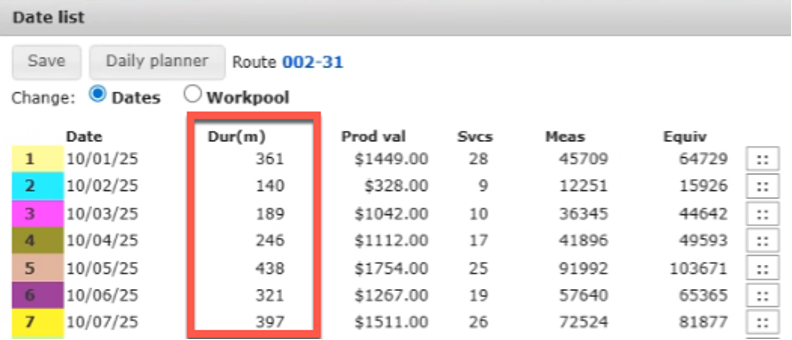
The service manager will organize and schedule each route to ensure each workday meets or exceeds minimum standards. Directions on how to use this took are available in SPP 302: Routing, Scheduling, & Assigning Work Using ServicePro Web Mapping.
Scheduling Initial Services
Initial services are scheduled at the time of sale. This ensures the customer is aware of the scheduled start time and any needed accommodations are clarified with both the customer and service center. The process is as follows:
Initial services are scheduled at the time of sale. This ensures the customer is aware of the scheduled start time and any needed accommodations are clarified with both the customer and service center. The process is as follows:
- At the time of sale, while still with the customer, the inspector will call the service center to schedule the initial service.
- The inspector will provide the administrative team member the sale information, including the time required to complete the initial service.
- The administrative team member will ask for the type of initial service and open the Scheduler for the appropriate route.
- Review the Scheduler availability and inform the inspector of the earliest options.
- The inspector will share the available initial service times and confirm with the customer their preference.
- Once the customer confirms their preference, enter the initial service into the scheduler by setting a time block. Specific directions for completing this process are available in SPP-418 Using the Scheduler for Starts.
- The general manager will ensure the sale paperwork is accurate and fully executed.
- When the admin receives and enters the start paperwork, verify the Scheduler time block for the specific customer and initial service. Each day the service manager will review the approved new start paperwork/documentation and ensure the start is assigned to the appropriate team member before it is to be serviced.
- If any changes to route/team member are needed, ensure the Scheduler is updated appropriately.
- In the rare instance the date or time needs to be changed, the service manager must contact the customer and confirm they accept the new date/time.
- If the customer cannot be reached or does not want the time change, the service manager will identify other resources to ensure the initial service is completed at the agreed upon time.