Section: Purchasing
Subject: Procedure, Order Non-Program M&S
Approved by: Tony Massey
Effective Date: 21 December 2021
Last Reviewed Date: 21 December 2021
Policy Owner: ERP Finance Manager
Policy #
A Service Center may need to order M&S, which is not part of the normal material rotation. Often, these items are not available in Microsoft Dynamics 365 (D365). This requires the requisition process to be completed on paper.
Filling Out the Purchase Request Form:
The following is the procedure for filling out the Purchase Request form for non-program materials and supplies:
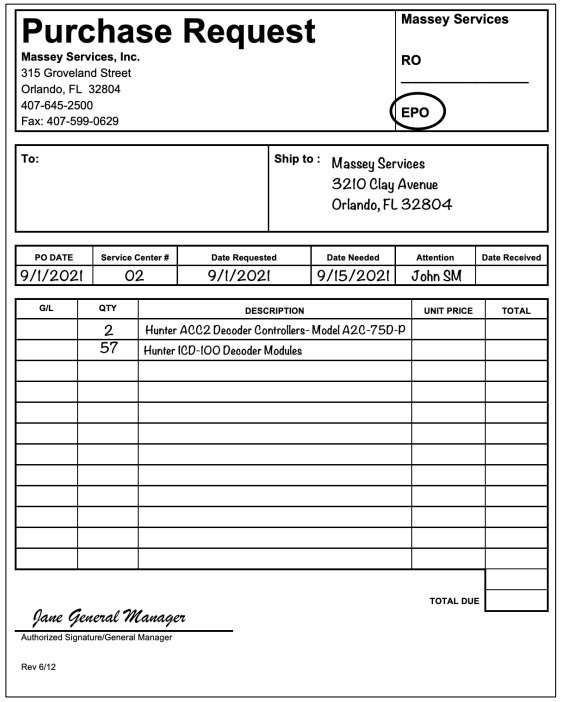
- In the upper right section of the form is the RO/EPO box. Indicate the order is an Emergency Order (EPO).
- To: Enter the vendor’s name. If you do not know, leave blank.
- Ship To: Enter the Service Center delivery address (Do not use post office box addresses).
- P.O. Date: Enter the date you are filling our the form.
- Service Center #: Enter the 3-digit Service Center number (include any leading zeroes).
- Date Requested: Enter date you originally requested the product(s).This is generally the same date you fill out the form.
- Date Needed: When you need to have the product(s) arrive at the Service Center.
- Attention: Print the name of the person receiving the order.
- Qty: Enter the number of units required (i.e., 1 case, 15 bags, 3 boxes, etc.).
- Description: Describe the product in detail, including container size (i.e., Extinguish Plus Fire Ant Bait 25 lb. bag).
- Unit Price and Total Columns: Leave blank. The Purchasing Department will fill in this information.
- Authorized Signature: The EPO WILL NOT be processed without the General Manager’s signature.
- Scan and email to the Corporate Purchasing Department.
- Administration will make a copy of each Purchase Request and place it in the Purchasing Suspense file.