MILO
Policy & Procedures
Technology Help Guides
Service Protocols & VTM Materials
Frequently Asked Questions
Initial Training Guides
Legal & Licensing Information
Home
Docs
Salesforce
Quick Reference Guides
QRG PAY.2 – Adding an Account to Autopay
QRG PAY.2 – Adding an Account to Autopay
Table of Contents
Adding an Account to Autopay
Adding an Account to Autopay
#
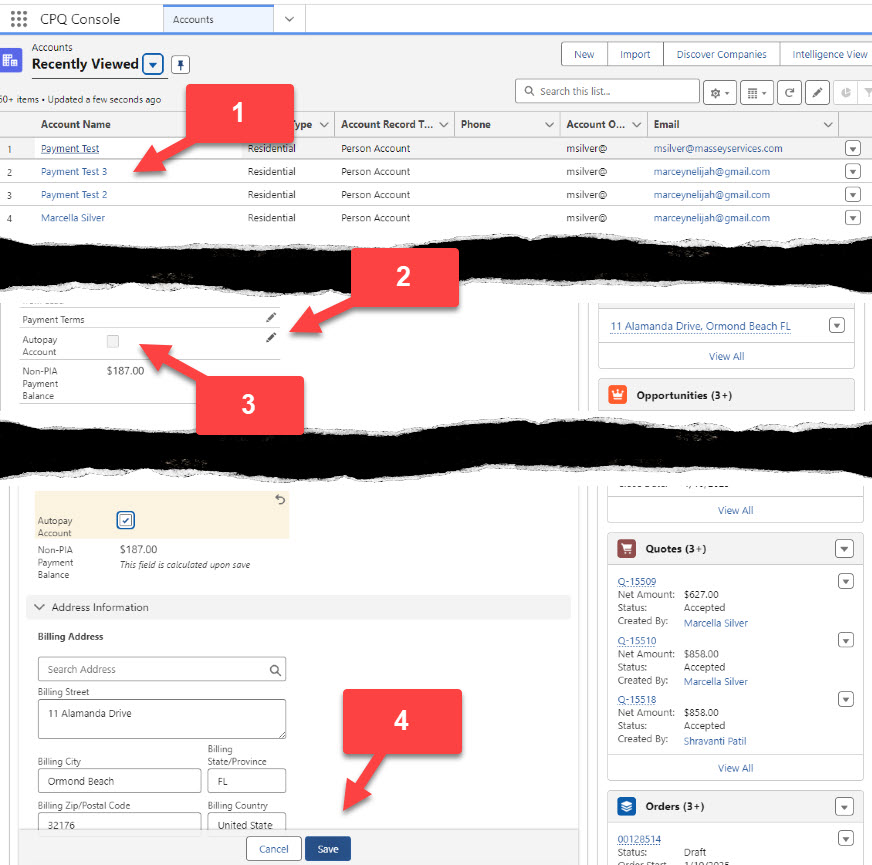
Search and Click on the account you wish to add autopay to from the account screen
Edit the customer home screen by clicking on any pencil
Check the box next to Autopay Account
Click Save
QRG PAY.2 – Adding an Account to Autopay
Download
Estimated Reading Time: < 1 min read
Listen
0:00
/
0:16
1×
Copy page
Copy page
Copy this page as Markdown for LLMs
View as Markdown
Open this page as plain Markdown
(opens in a new tab)
Export PDF
Download this page as a PDF
Open in ChatGPT
Ask questions about this page
(opens in a new tab)
Open in Claude
Ask questions about this page
(opens in a new tab)
Open in Google AI Studio
Ask questions about this page (Google account required)
(opens in a new tab)