QRG PAY.4 – Adding an ACH Token to an Account


Adding an ACH Token to an Account #

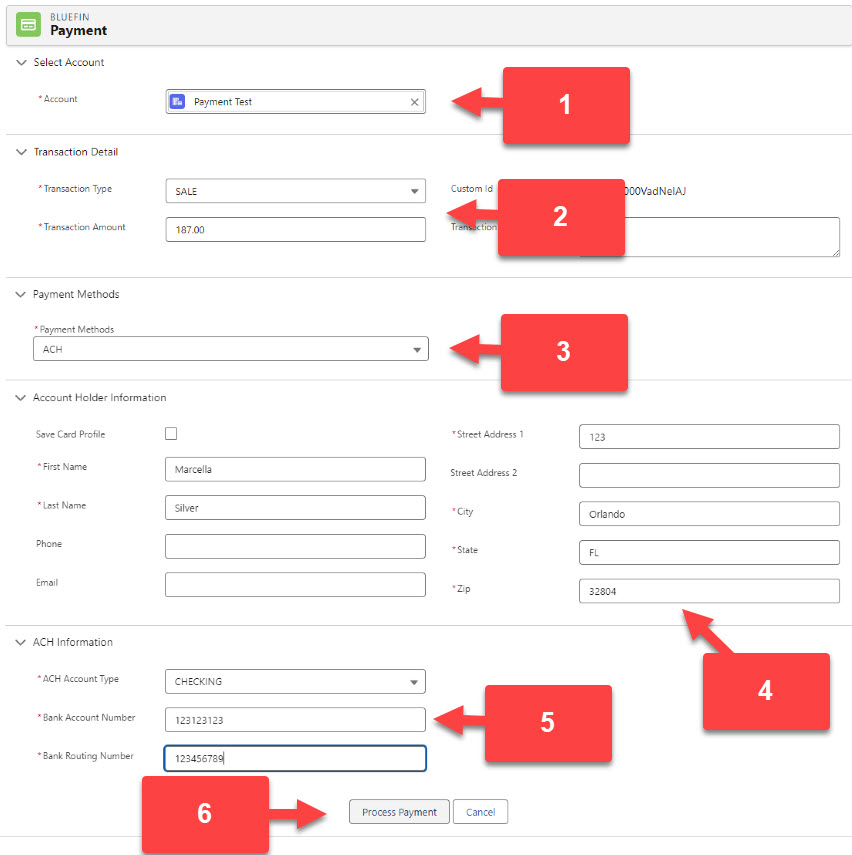
  1. Select the customer’s Account
  2. Select the Transaction Type and enter the amount to process.
  3. Select ACH in the Payment Method
  4. Fill in the customer details

!! Check the box next to Save Card Profile if the customer would like to save the ACH to the account. Do Not check the box next to Save Card Profile if the customer does not wish to keep the ACH on file!!

  1. Select CHECKING and Enter the Bank Account Number and the Routing Number.
  2. Click Process Payment.

Estimated Reading Time: < 1 min read