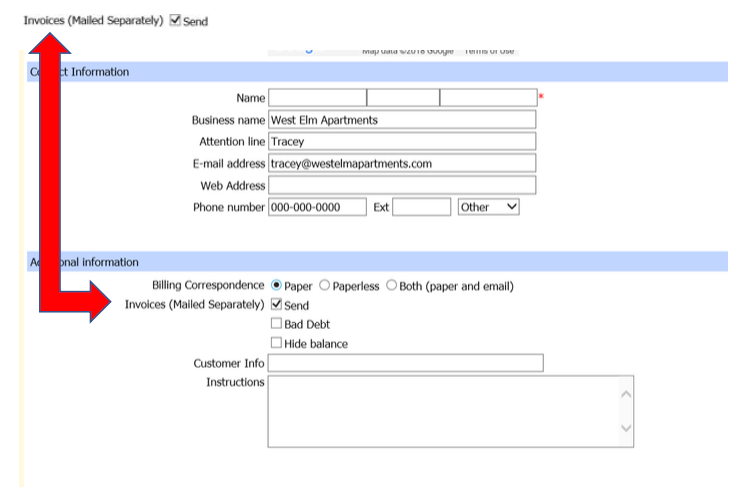
We recently announced the ability to choose sending statements via Paper, Paperless, or Both on our customers’ accounts in Service Pro. At this same time, Invoices (Mailed Separately) was added. This option is ONLY for accounts that prefer individual invoices mailed, after the service is completed. Examples of these accounts are Multi-family and Commercial accounts that cannot pay from a statement and require more detail. This option should not be checked for residential accounts. This is located in the account information.
Effective immediately, all existing multi-family and Pay Plan accounts will have this option checked. As you add new accounts that require individual invoices, check this box.
- Invoices will be mailed direct from corporate every Tuesday for work completed the week prior
- Invoiceswillnotbemailedtothosealreadymarkedasprinted
- Invoicescannotbeemailed,evenifPaperlessisthechosenbillingoption
- Invoices will be mailed only one time and be marked as printed
- The account will be noted that the invoice was mailed
- Invoices will not be mailed to accounts marked as Quality Assurance or Corporate Billed
- Monthly Statements will still be mailed or emailed depending on the billing option chosen
For Multi-family accounts, a new site must be added for each new unit/building treated
- Unit and building info must be added to Address Line 2 in the Service Address so that when invoices are generated the customer knows which building and unit it is for

For Commercial accounts the site information should include the name of the business and the store #, who our contact is, their email address, and the locations phone number:

If the customer requires additional detail on the invoice, add that to the Invoice Note section in the Invoice Detail.
