To effectively communicate with our customers at the service and billing levels, we need to consistently enter accounts in a uniform manner. When adding or updating a Commercial and Multi-Family Account in Service Pro, it’s imperative that the following steps occur, regardless of the service sold.
Account Information
- The Account Information (Billing Information) is directed by the customer and should always contain proper information for billing the account and confirmed by admin at the Welcome to Massey Call.
- The Keyword field in Account Information
- If the customer is a Corporate Billed customer, please obtain the Keyword from Corporate Billing (CorporateBilling@MasseyServices.com)
- If a Commercial customer is not Corporate Billed, the Keyword is the Business Name ▪ Ex: a McDonald’s, where the franchise name is Melissa’s Foods
- KEYWORD: McDonalds – Melissas Foods
- Notice we won’t use the punctuation
- Ex: Firehouse Subs

If a Multi-Family customer is not Corporate Billed, the Keyword is the name of the management company
- Ex: Leisure Village Apartments, managed by Greystar
- KEYWORD: Greystar
Additional Information
If the customer prefers to receive their monthly statements via email, mark the Billing Correspondence as Paperless. With this option the customer can view and print individual invoices.
If the account is NOT Corporate Billed, and the customer prefers to pay from an invoice rather than a statement, the “Invoices (Mailed Separately) Send” box should be checked. This is ALL Apt/Condo and most Commercial customers. The customer will be automatically mailed an invoice the week after its posted.

The Service Info for the location serviced is entered as:
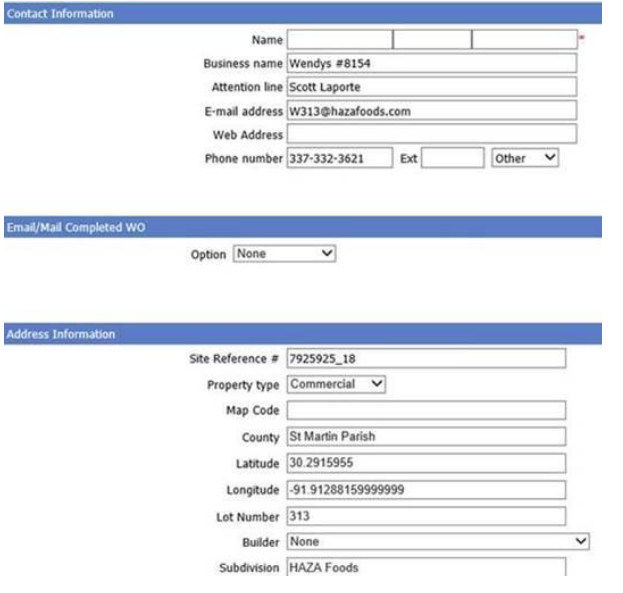
Contact Information (example below)
- Business Name: name of the store and the corporation’s assigned #
- The franchise store or site # and the corporations store or site # are often different. To be consistent, and so that we can make the corporation aware of any issues, its very important that the corporations assigned store # be used in the Business Name field
- Attention Line: the store or property manager, or whomever our contact at the location is
- Email Address: the email address of whomever receives workorders and information at the store or property level
- Phone Number: the phone number of the store or property
Email/Mail Completed WO
- Option: choose how they wish to receive their workorder (printed or emailed)
Address Information
- Lot Number: the franchise store #, if there is one assigned by the franchise
- Subdivision: the name of the franchise
Service Information from the Site:
*note – all current Wendy’s sites are in the process of being updated